Featured Post Today
print this page
Latest Post
Showing posts with label iphone. Show all posts

Apple iPhone 5 Specifications


GENERAL2G NetworkGSM 850 / 900 / 1800 / 1900 - GSM A1428
 CDMA 800 / 1700 / 1900 / 2100 - CDMA A1429
3G NetworkHSDPA 850 / 900 / 1900 / 2100 - GSM A1428
 CDMA2000 1xEV-DO - CDMA A1429
4G NetworkLTE 700 MHz Class 17 / 1700 / 2100 - GSM A1428 or LTE 850 / 1800 / 2100 - GSM A1429
 LTE 700 / 850 / 1800 / 1900 / 2100 - CDMA A1429
Announced2012, September
StatusComing soon. Exp. release 2012, September 21st
BODYDimensions123.8 x 58.6 x 7.6 mm
Weight112 g
DISPLAYTypeLED-backlit IPS TFT, capacitive touchscreen, 16M colors
Size640 x 1136 pixels, 4.0 inches (~326 ppi pixel density)
MultitouchYes
ProtectionCorning Gorilla Glass, oleophobic coating
SOUNDAlert typesVibration, propriety ringtones
LoudspeakerYes
3.5mm jackYes
MEMORYCard slotNo
Internal16/32/64 GB storage, 1 GB RAM
DATAGPRSYes
EDGEYes
SpeedDC-HSDPA, 42 Mbps; HSDPA, 21 Mbps; HSUPA, 5.76 Mbps, LTE, 100 Mbps; Rev. A, up to 3.1 Mbps
WLANWi-Fi 802.11 a/b/g/n, dual-band, Wi-Fi Plus Cellular
BluetoothYes, v4.0 with A2DP
USBYes, v2.0
CAMERAPrimary8 MP, 3264x2448 pixels, autofocus, LED flash
FeaturesTouch focus, geo-tagging, face detection, panorama, HDR
VideoYes, 1080p@30fps, LED video light, video stabilization, geo-tagging
SecondaryYes, 1.2 MP, 720p@30fps, videocalling over Wi-Fi and 3G/4G
FEATURESOSiOS 6
ChipsetApple A6
SensorsAccelerometer, gyro, proximity, compass
MessagingiMessage, SMS (threaded view), MMS, Email, Push Email
BrowserHTML (Safari)
RadioNo
GPSYes, with A-GPS support and GLONASS
JavaNo
ColorsBlack/Slate, White/Silver
 - nano-SIM card support only
- Active noise cancellation with dedicated dual mics
- Siri natural language commands and dictation
- iCloud cloud service
- Twitter and Facebook integration
- TV-out
- Maps
- iBooks PDF reader
- Audio/video player and editor
- Image editor
- Voice memo/command/dial
BATTERY Standard battery, Li-Po
Stand-byUp to 225 h (2G) / Up to 225 h (3G)
Talk timeUp to 8 h (2G) / Up to 8 h (3G)
Music playUp to 40 h
0 comments

10 - 3D Wallpapers for iPhone

Human artificial face 3d Iphone wallpaper
Bird 3d iphone wallpaper
Black pebbles 3d iphone wallpaper
Coffee city 3d iphone wallpaper
Finding Nemo 3d iphone wallpaper
Paper boat 3d iphone wallpaper
Rocking out 3d iphone wallpaper
Rotation 3d iphone wallpaper
Wet pink texture 3d iphone wallpaper
Black tiles 3d iphone wallpaper

0 comments

Google Mobile App for iPhone Overhauled ! Gets Tons Of New Features & New Name


You're probably accustomed to using the Google Mobile App on your iPhone and iPod touch. However, Google has just overhauled that app and has added tons of new features, and with them, comes a brand new name. Introducing, Google Search App.

A Completely Redesigned Home Screen Of Google Search App
However, there's much more to the Google Search App, other than the simple Google Search functionality.
First, you’ll see that there are now more ways to interact with the app. When browsing through search results or looking at a webpage, you can swipe down to see the search bar or change your settings. For those who use other Google apps, there’s an Apps button at the bottom of the screen for rapid access to the mobile versions of our products.
We also included a new toolbar that will make it easier for you to filter your results. You can open this toolbar by swiping from left to right — either before you search or once you’ve got your results. If you only want images, just tap “Images,” and the results will update as shown:
It is now easier to pick off searching from where you left off in Google Search App. If you have left the app and return later, you can either perform a fresh search by either tapping in the search box to type, hitting the microphone button to do a voice search or tapping on the camera icon to use Google Goggles, or you can tap the lower part of the page to get back to where you left from.
Finally, there are a number of improvements we’ve made to everything else you love in the app, including Google Goggles, Voice Search, Search with My Location, Gmail unread counts and more. There's a lot in the app, so we've added a simple help feature to let you explore it. Access this by tapping the question mark above the Google logo.
Check out the Google Search App for iPhone in action, down below.
Download Google Search App for iPhone and iPod touch

0 comments

Chef Sleeve For iPad


I was sent the Chef Sleeve (for iPad) for review all the way from the US. The Chef Sleeve is essentially a transparent plastic bag that you can place your iPad in when you are using it in the kitchen when cooking or baking.
This ensure that your iPad will not be dirtied by the grease on your finger or flour on the table when you need to use it in the kitchen (for checking recipes online or even watching YouTube for cooking/baking tutorial).
Li Xiang even mentioned that it is good for girls who use their iPad on the makeup table (watching their favorite Korean videos on YouTube while having their makeup on). The Chef Sleeve will ensure that their makeup powder will not dirty the iPad.
Some other use cases includes hospital & clinic, car workshops and you can even bring your iPad to the beach without worrying the sand getting into the ports of your iPad.
The Chef Sleeve will work for all generations of iPad.
Some of the Chef Sleeve features:
  • Effortless Protection – A re-sealable strip makes it easy to close the sleeve. When you’re done making a mess, just dispose or recycle. It’s as simple and worry-free as that.
  • Ultra-Clear Material – Unlike other plastic bags, you will hardly know Chef Sleeve is there.
  • Touch Sensitive – You can still use all your favorite apps while making a mess. Your iPad’s touch screen works perfectly under the thin protective film.
  • Designed Specifically for the iPad – The sleeve fits perfectly, allowing you to easily grip your iPad while providing coverage for all output/input ports.
  • Packaging Doubles as a Stand – The sturdy packaging has a trick up its sleeve. It can be used as an iPad stand.
  • 100% Recyclable – Chef Sleeve is good for your iPad and the environment.
If you are living in Singapore, you can get the Chef Sleeve for SGD$35 per box at Hip Product Factory. If you order online, do remember to quote my name “Lester Chan” and you will get SGD$5 off =)
Alternatively, you can get it from Howards Storage World located in Harbourfront, Millenium Walk and Parkway Parade. It will be available soon at other stores such as Sprint-Cass (Changi Airport), iStudio, Juzz1, Takashimaya, etc.
If you live in the US, the Chef Sleeve will cost about USD$20 and you can get it at the following locations.
Chef Sleeve - Box
Chef Sleeve – Box
Chef Sleeve - Box
Chef Sleeve – Box
Chef Sleeve - Box As Stand
Chef Sleeve – Box As Stand
Chef Sleeve
Chef Sleeve
Chef Sleeve - With iPad (Front)
Chef Sleeve – With iPad (Front)
Chef Sleeve - With iPad (Back)
Chef Sleeve – With iPad (Back)

0 comments

Apple USB Ethernet Adapter


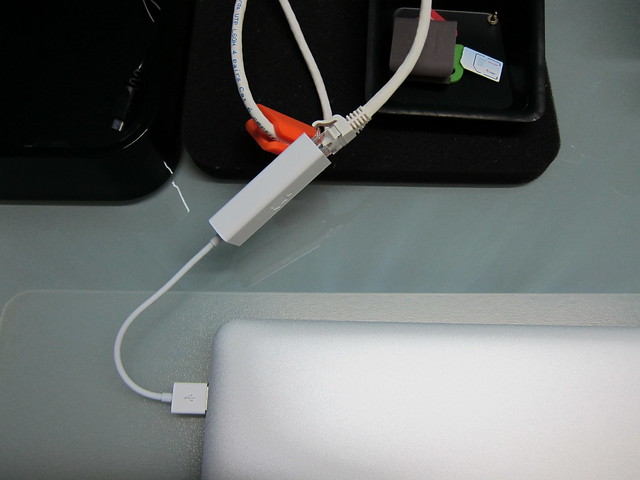
Got the Apple USB Ethernet Adapter for SGD$35.51 (normal price is SGD$38) from iStudio located in Changi Airport Terminal 3 while I went to Malaysia for my birthday celebration.
As you are aware by now the MacBook Air does not come with an ethernet port because of its slim design, so if you need to use a LAN cable for MacBook Air, this adapter is your best and only bet. Call me old fashion but I still prefer to transfer files over LAN as it is the speed is much faster and more stable.
This adapter is only capable of 10/100Mbps speed since theoretically USB2 speed max out at 480Mbps which is much less than the speed of a gigabit network so if this were to be made for 10/100/1000Mbps, it wouldn’t be accurate and that is the reason why Apple supports 10/100Mbps only. Perhaps when USB3 comes out, this will be refreshed to support 10/100/1000Mbps as USB3 is capable of supporting up to 5,000Mbps.
I love how Apple design the cover for this, it holds the RJ45 port and the USB port side by side.
Apple USB Ethernet Adapter - Packaging Front View
Apple USB Ethernet Adapter – Packaging Front View
Apple USB Ethernet Adapter - Packaging Back View
Apple USB Ethernet Adapter – Packaging Back View
Apple USB Ethernet Adapter
Apple USB Ethernet Adapter - Cover
Apple USB Ethernet Adapter – Cover
Apple USB Ethernet Adapter - Connected To MacBook Air
Apple USB Ethernet Adapter – Connected To MacBook Air

0 comments

The Best Way To Create Iphone 4s Siri Conversation Online FreeTool


Siri on iPhone 4S allows you to make use of your voice to send text messages, schedule meetings, place cell phone calls, and more. Siri knows what you mention, is aware of exactly what you mean, and even talks back again.
Presently there tend to be a number of blogs dedicated to collecting screenshots of exciting, and sometimes bizarre, discussions that people have got using Siri in their iPhone 4S.


In case you might prefer to generate your very own picture of Siri conversations still don’t got an iPhone, there’s a latest application known as iFakeSiri that may assist you. Simply compose an issue in plain text and the iFakeSiri generator will immediately make that text message straight into a Siri chat without having you to acquire any kind of Photoshop abilities


 Check Out The Video Tutorial A Short Review About How To Use An iFakesiri.com
0 comments
 
Support : Creating Website | Johny Template | Mas Template
Copyright © 2011. Asianz Club - All Rights Reserved
Template Created by Creating Website Published by Mas Template
Proudly powered by Blogger